Transantiago Visualization 
Juan Pizarro

Data
Data schema
- Fecha Hora Gps UTC (Alfanumérico): Fecha de la transmisión del bus.
- Patente (Alfanumérico ): Patente del bus, ejemplo VX-2321 o BJFP-93.
- Latitud (Numérico con decimales): Coordenada geográfica de la última transmisión, correspondiente a la proyección EPSG4326 - WSG 84.
- Longitud (Numérico con decimales): Coordenada geográfica de la última transmisión, correspondiente a la proyección EPSG4326 - WSG 84.
- Velocidad Instantánea (Numérico con decimales): En km/h redondeado a 1 decimal.
- Dirección Geográfica Movimiento del bus (Numérico entero): Son 8 direcciones posibles que indican dirección general del movimiento instantáneo. Los valores posibles son: 0 = Norte, 1 = Noreste, 2 = Este, 3 = Sureste, 4 = Sur, 5 = Suroeste, 6 = Oeste, 7 = Noroeste.
- Número de Operador (Numérico entero): identificador del concesionario.
- Nombre Comercial del Servicio (Alfanumérico): Código Sistema Sinóptico del servicio que está haciendo el bus, por ejemplo T515. Es necesario para la conversión de código Sinóptico a código usuario utilizar está tabla (assets/les/serviciosdeco.txt)
- Sentido (Alfabético): Sentido de la ruta en la que circula el bus, puede ser: I - Ida, R - Retorno, vacío - sin sentido asociado
- Ruta Consola del Bus (Alfanumérico): Ruta asignada al bus por consola, por ejemplo T201 00I
- Ruta en Sinóptico (Alfanumérico): Ruta asignada al bus, por ejemplo T201 03I
- Fecha Hora de inserción UTC (Alfanumérico): Fecha hora en que el registro de la transmisión fue ingresado a la Base de datos.
{
"fecha_consulta": "20161010233501",
"posiciones": [
"11-10-2016 02:32:45;BJFC-73;-33.414623260498;-70.7666549682617;0.0;0.0;5.0;T502;R;T502 00R;T502 00R;11-10-2016 02:32:51;11-10-2016 02:27:45;BJFC-73;-33.414623260498;-70.7666549682617;0.0;0.0;5.0;T502;R;T502 00R;T502 00R;11-10-2016 02:27:51;11-10-2016 02:22:45;BJFC-73;-33.414623260498;-70.7666549682617;0.0;0.0;5.0;T502;R;T502 0...",
"11-10-2016 02:32:45;BJFC-73;-33.414623260498;-70.7666549682617;0.0;0.0;5.0;T502;R;T502 00R;T502 00R;11-10-2016 02:32:51;11-10-2016 02:27:45;BJFC-73;-33.414623260498;-70.7666549682617;0.0;0.0;5.0;T502;R;T502 00R;T502 00R;11-10-2016 02:27:51;11-10-2016 02:22:45;BJFC-73;-33.414623260498;-70.7666549682617;0.0;0.0;5.0;T502;R;T502 0..."
]}
var vehicle = "11-10-2016 02:32:45;BJFC-73;-33.414623260498;-70.7666549682617;0.0;0.0;5.0;T502;R;T502 00R;T502 00R;11-10-2016 02:32:51;11-10-2016 02:27:45;BJFC-73;-33.414623260498;-70.7666549682617;0.0;0.0;5.0;T502;R;T502 00R;T502 00R;11-10-2016 02:27:51;11-10-2016 02:22:45;BJFC-73;-33.414623260498;-70.7666549682617;0.0;0.0;5.0;T502;R;T502 00R;T502 00R;11-10-2016 02:22:51;11-10-2016 02:17:44;BJFC-73;-33.414623260498;-70.7666549682617;0.0;0.0;5.0;T502;R;T502 00R;T502 00R;11-10-2016 02:17:51;";

var arr = /^([^;]+[;]){1}([^;]+);([^;]+);([^;]+);([^;]+);([^;]+);([^;]+);([^;]+);([^;]+);([^;]+);([^;]+);([^;]+);([^;]+);/.exec(vehicle);
[ '11-10-2016 02:32:45;BJFC-73;-33.414623260498;-70.7666549682617;0.0;0.0;5.0;T502;R;T502 00R;T502 00R;11-10-2016 02:32:51;11-10-2016 02:27:45;',
  '11-10-2016 02:32:45;',
  'BJFC-73',
  '-33.414623260498',
  '-70.7666549682617',
  '0.0',
  '0.0',
  '5.0',
  'T502',
  'R',
  'T502 00R',
  'T502 00R',
  '11-10-2016 02:32:51',
  '11-10-2016 02:27:45',
  index: 0,
  input: '11-10-2016 02:32:45;BJFC-73;-33.414623260498;-70.7666549682617;0.0;0.0;5.0;T502;R;T502 00R;T502 00R;11-10-2016 02:32:51;11-10-2016 02:27:45;BJFC-73;-33.414623260498;-70.7666549682617;0.0;0.0;5.0;T502;R;T502 00R;T502 00R;11-10-2016 02:27:51;11-10-2016 02:22:45;BJFC-73;-33.414623260498;-70.7666549682617;0.0;0.0;5.0;T502;R;T502 00R;T502 00R;11-10-2016 02:22:51;11-10-2016 02:17:44;BJFC-73;-33.414623260498;-70.7666549682617;0.0;0.0;5.0;T502;R;T502 00R;T502 00R;11-10-2016 02:17:51;' ]

Custom S3 endpoint
- http access
- python + Boto 3
- Scala + AWSJavaSDK
- R + aws.s3
http access
curl "http://mtt-scl.data.pedalean.com/pedalean/?prefix=mtt-gz/2017/05/12/06/&max-keys=1000"

curl "http://mtt-scl.data.pedalean.com/pedalean/mtt-gz/2017/05/12/06/20170512062502.json.gz"
python + Boto 3
In [2]:
import boto3
from botocore.utils import fix_s3_host
from botocore.handlers import disable_signing

endpoint_url='http://mtt-scl.data.pedalean.com'
bucket_name = 'pedalean'
prefix = 'mtt-gz/2017/04/20/01/'

resource = boto3.resource('s3', endpoint_url=endpoint_url)

resource.meta.client.meta.events.unregister('before-sign.s3', fix_s3_host)
resource.meta.client.meta.events.register('choose-signer.s3.*', disable_signing)

bucket = resource.Bucket(bucket_name)

key_list = [k.key for k in bucket.objects.filter(Prefix=prefix)]
key_list[:5]
Out[2]:
In [3]:
import boto3
from botocore.utils import fix_s3_host
from botocore.handlers import disable_signing

endpoint_url='http://mtt-scl.data.pedalean.com'
bucket_name = 'pedalean'
s3key = key_list[0]

client = boto3.client('s3', endpoint_url=endpoint_url)

client.meta.events.unregister('before-sign.s3', fix_s3_host)
client.meta.events.register('choose-signer.s3.*', disable_signing)

response_key = client.get_object(Bucket=bucket_name,Key=s3key)
response_key
Out[3]:
Scala + AWSJavaSDK
import com.amazonaws.auth.AnonymousAWSCredentials
import com.amazonaws.services.s3.AmazonS3Client
import com.amazonaws.services.s3.S3ClientOptions

val endpoint_url = "http://mtt-scl.data.pedalean.com"
val credentials = new AnonymousAWSCredentials()
val s3 = new AmazonS3Client(credentials)
s3.setEndpoint(endpoint_url)
s3.setS3ClientOptions(new S3ClientOptions().withPathStyleAccess(true))
import com.amazonaws.services.s3.model.GetObjectRequest

val s3Filename = "mtt-gz/2017/04/29/12/20170429120002.json.gz"
val request = new GetObjectRequest(bucket, s3Filename)
val wrappedObject = s3.getObject(request)
val myData= scala.io.Source.fromInputStream(wrappedObject.getObjectContent()).mkString
import scala.collection.JavaConverters._
import scala.collection.JavaConversions.{collectionAsScalaIterable => asScala}
import com.amazonaws.services.s3.model.ListObjectsRequest
import com.amazonaws.services.s3.model.ObjectListing
import com.amazonaws.services.s3.model.S3ObjectSummary
import scala.collection.mutable.ListBuffer

val request = new ListObjectsRequest()
request.setBucketName(bucket)
request.setPrefix(prefix)
request.setMaxKeys(pageLength)

val fileList = ListBuffer[(Int, String)]()
var counter = 0

var objectListing: ObjectListing = null

do {
  objectListing = s3.listObjects(request)
  objectListing.getObjectSummaries.foreach { objectSummary =>
  fileList += Tuple2(counter, objectSummary.getKey)
            counter += 1
  }
  request.setMarker(objectListing.getNextMarker());
} while (objectListing.isTruncated())

val summaries = fileList.map(_._2).toList
R + aws.s3
install
if (!require("ghit")) {
    install.packages("ghit")
}
ghit::install_github("jpizarrom/aws.s3[custom-url-schema]", uninstall = TRUE, verbose = TRUE, build_vignettes = FALSE)
library("aws.s3")
get bucket
r <- get_bucket(prefix = 'mtt-gz/2017/', bucket = 'pedalean', base_url = "mtt-scl.data.pedalean.com", verbose=FALSE, check_region=FALSE, url_style="path", url_schema="http://", parse_response=TRUE, max=1000)
r
Trip Duration

Motivación
Observadores sin conflicto de intereses?
Actual costs


Cache Design
Client +---> cloudflare +---> heroku/nginx/cache +---> s3

  server {
    listen     8000;

    location / {
      proxy_pass http://your_s3_bucket.s3.amazonaws.com;

      aws_access_key your_aws_access_key;
      aws_secret_key the_secret_associated_with_the_above_access_key;
      s3_bucket your_s3_bucket;

      proxy_set_header Authorization $s3_auth_token;
      proxy_set_header x-amz-date $aws_date;
    }

    # This is an example that does not use the server root for the proxy root
    location /myfiles {

      rewrite /myfiles/(.*) /$1 break;
      proxy_pass http://your_s3_bucket.s3.amazonaws.com/$1;

      aws_access_key your_aws_access_key;
      aws_secret_key the_secret_associated_with_the_above_access_key;
      s3_bucket your_s3_bucket;
      chop_prefix /myfiles; # Take out this part of the URL before signing it, since '/myfiles' will not be part of the URI sent to Amazon


      proxy_set_header Authorization $s3_auth_token;
      proxy_set_header x-amz-date $aws_date;
    }

  }
Get and Store
Probe +---> StorageGet and store in S3
req = urllib2.Request(os.environ['SERVICE_URL'])
base64string = base64.b64encode('%s:%s' % (username, password))
req.add_header("Authorization", "Basic %s" % base64string)
req.add_header('Accept-encoding', 'gzip')
r = urllib2.urlopen(
    req, timeout=int(os.environ.get('SERVICE_TIMEOUT', 120)), context=ctx)
if r.info().get('Content-Encoding') == 'gzip':
    buf = StringIO(r.read())
    f = gzip.GzipFile(fileobj=buf)
    data = json.load(f)
else:
    data = json.load(r)

    ...

s3_client.upload_file(tmp_file.name, bucket, s3_key, ExtraArgs=extra_args)
docker
FROM webhippie/python:2

CMD ["/bin/s6-svscan", "/etc/s6"]

ENV CRON_ENABLED true

ADD requirements.txt /srv/app/requirements.txt
RUN pip install -r /srv/app/requirements.txt

ADD app.py /srv/app/app.py

ADD rootfs /
docker cron
* * * * * python /srv/app/app.py | awk '{ print strftime("%c: "), $0; fflush(); }'
lambda
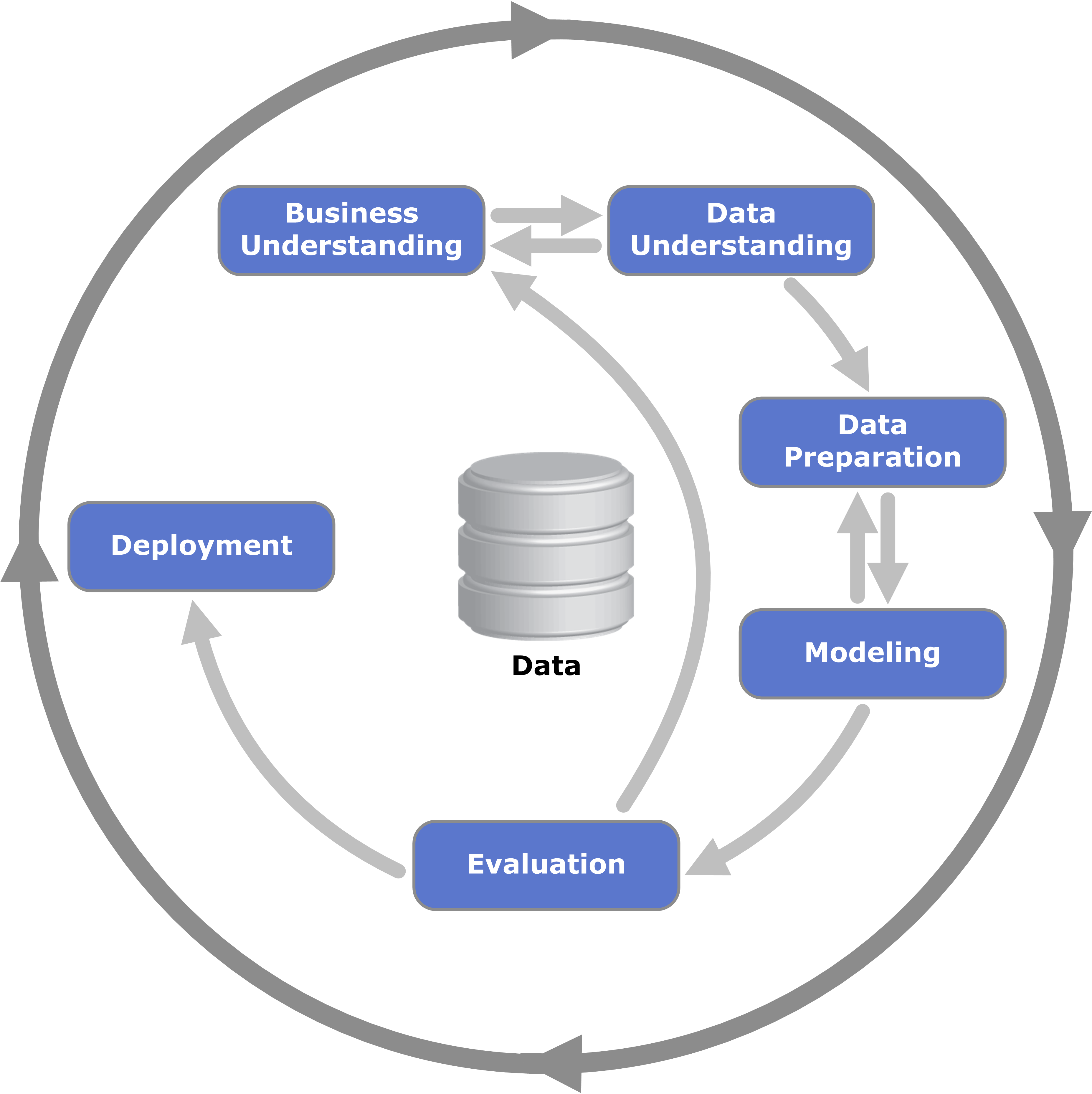
CRISP-DM
- Phase 1: Business Understanding
- Phase 2: Data Understanding
- Phase 3: Data Preparation
- Phase 4: Modeling
- Phase 5: Evaluation
- Phase 6: Deployment
CRISP-DM
Business Understanding
Data Understanding
- Collecting the data
- explore data (https://community.cloud.databricks.com/)
Data Preparation